

Views: 0 Author: Site Editor Publish Time: 2026-08-23 Origin: Site


Many industry professionals assume standard black power cords are universally interchangeable across all hardware. This assumption often surfaces when replacing lost manufacturer-specific cables on job sites or in server rooms. However, treating power delivery as an afterthought introduces severe operational risks. Forcing visually similar connectors into incompatible ports can cause immediate hardware damage. Mismatching voltage, amperage, or polarity leads to thermal hazards, compliance violations, and unexpected downtime.
A safe power connection requires more than just a physical fit. You must evaluate device specifications, power source compatibility, environmental requirements, and safety standards. Selecting the correct AC Power Cable prevents catastrophic equipment failure. We see this constantly in the field. A technician grabs whatever cable is in the bin, plugs it in, and walks away. Hours later, the equipment fails or a breaker trips. This guide provides a structured framework for evaluating power cords, ensuring your infrastructure remains secure, compliant, and fully operational.
Defining a safe and functional power connection requires understanding electrical compatibility. A cable that physically fits into a port is not automatically safe to use. You must establish success criteria based on voltage ratings, current capacity, and connector design. We have pulled countless melted cables from server racks because someone assumed a fit meant it was safe.
The term "universal power cord" usually refers to the IEC 60320 C13 connector. This is the standard "kettle lead" or PC power cord. You will find it on desktop computers, monitors, televisions, and basic enterprise hardware. The C13 form factor became the default for low-to-medium draw IT equipment because it offers a reliable, standardized connection. It replaced many proprietary, manufacturer-specific cords that previously complicated hardware deployment.
Standardization simplifies procurement and maintenance. Facilities can stock a single type of cable for most workstations. However, this convenience creates a false sense of security. Users often assume any C13 cable can power any device with a C14 inlet. This assumption ignores the internal wire gauge and the maximum current rating of the cable itself. A thin 18 AWG cable might run a monitor fine, but it will overheat if you plug it into a 1000W power supply.
When we audit facilities, we frequently find these mismatched cables. The outer jacket looks identical to a heavy-duty cord, but the internal copper is insufficient. This is a hidden fire hazard waiting for a peak load event to ignite.
Physical compatibility does not equal electrical compatibility. A cable designed for a low-power monitor might physically fit into a high-draw network switch. If the cable's internal wiring cannot handle the switch's current demand, the wire will overheat. This creates a significant fire hazard and risks damaging the connected equipment.
Regional grid differences further destroy the myth of universality. North American grids operate at 120V, while many international grids use 240V. Plug standards also vary wildly. North America uses NEMA standards, the UK uses BS 1363, and Europe relies on Schuko plugs. A cable built for a 120V environment may lack the insulation required for a 240V system. You must match the cable to both the device and the regional power infrastructure.
| Region | Standard Voltage | Common Plug Type | Frequency |
|---|---|---|---|
| North America | 120V | NEMA 5-15 / 5-20 | 60Hz |
| Europe | 230V | Schuko (Type F) | 50Hz |
| United Kingdom | 230V | BS 1363 (Type G) | 50Hz |
| Japan | 100V | JIS C 8303 (Type A/B) | 50Hz / 60Hz |
Using a North American cable in Europe with a simple plug adapter is a common mistake. The cable insulation might not be rated for 230V. Over time, the insulation degrades, leading to a short circuit. Always verify the voltage rating printed on the cable jacket.
Mapping cable specifications to operational safety ensures hardware longevity. You must evaluate connectors, power sources, wire gauges, and the critical differences between straight cables and adapters. Field experience shows that skipping these checks leads to equipment failure.
The IEC 60320 standard defines multiple connector types. Visually similar connectors are deliberately distinct to prevent dangerous forced-fit errors. Understanding these distinctions is crucial for safe deployment.
| Connector Type | Common Name | Typical Applications | Key Features |
|---|---|---|---|
| C5/C6 | "Mickey Mouse" | Laptops, portable projectors | Three-prong, compact design for portable electronics. |
| C7/C8 | "Figure-8" | Consumer electronics, audio equipment | Unpolarized, two-prong design for low-power devices. |
| C13/C14 | Standard PC Cord | IT hardware, displays, desktop computers | The most common standard for low-to-medium draw equipment. |
| C15/C16 | High-Temp Cord | Network switches, enterprise servers | Features a distinct notch to prevent standard C13 usage in high-heat areas. |
| C19/C20 | High-Draw Cord | Blade servers, UPS systems, PDUs | Rectangular pins designed for high-amperage enterprise equipment. |
The notch on the C15 connector is a critical safety feature. High-temperature devices require cables with specialized insulation. The notch prevents a standard, lower-rated C13 cable from being inserted. Forcing a C13 into a C16 inlet bypasses this safety mechanism and invites thermal failure. We have seen technicians shave down the plastic on a C13 to make it fit a C16 inlet. This is a massive safety violation and will cause a fire.
You must match the source end of the cable to your facility's infrastructure. Connecting a device to a standard wall outlet requires a different plug than connecting to a rack-mounted Power Distribution Unit (PDU). In North America, wall outlets typically use NEMA 5-15R or 5-20R receptacles. Your cable must have a matching NEMA 5-15P or 5-20P plug.
Data centers often use PDUs with IEC C13 or C19 outlets. In these environments, you need jumper cables (e.g., C14 to C13, or C20 to C19) rather than standard wall plugs. Failing to match the receptacle type forces the use of adapters, which introduce additional points of failure and increase electrical resistance. Every adapter you add to a circuit increases the chance of a loose connection and subsequent arcing.
American Wire Gauge (AWG) determines a cable's current capacity. Lower AWG numbers indicate thicker wires. Thicker wires carry more current safely. A 14 AWG cable can handle more amperage than an 18 AWG cable. You must verify the AWG rating printed on the cable jacket before deployment.
Using a high-gauge (thinner wire) cable on a high-amperage device creates severe thermal risks. If you connect a heavy-duty server to an 18 AWG cable, the wire will resist the high current flow. This resistance generates heat. The insulation can melt, leading to short circuits, equipment damage, and electrical fires. Always ensure the cable's amperage rating exceeds the device's maximum draw.
| AWG Rating | Typical Max Amperage (Standard Lengths) | Common Use Case |
|---|---|---|
| 18 AWG | 10 Amps | Monitors, basic desktop PCs |
| 16 AWG | 13 Amps | Workstations, small servers |
| 14 AWG | 15 Amps | Network switches, standard PDUs |
| 12 AWG | 20 Amps | High-density servers, large UPS systems |
Procurement teams often confuse straight AC cables with AC/DC adapters. Straight AC cables only pass alternating current from the wall to the device. The device's internal power supply handles the conversion. AC/DC adapters, however, convert alternating current to direct current before it reaches the device. They also regulate voltage and polarity.
This confusion causes frequent hardware failures. When users lose power cords for security cameras or smart home hubs, manufacturer support is often lacking. Users mistakenly buy incompatible "universal" adapters. To safely replace an adapter, you must meet strict requirements. The voltage must match exactly. The amperage must meet or exceed the device's requirements. The barrel connector's polarity (center-positive or center-negative) must align perfectly. Plugging a 12V adapter into a 5V camera will instantly fry the internal board.
Moving from individual device replacement to facility-wide procurement requires evaluating specialized environments. Standard indoor cables fail under extreme conditions or high-density loads. You need to specify the right jacket material and connector type for the specific job site.
High-density data centers rely on C19/C20 cables for blade servers and high-capacity PDUs. These environments draw massive amounts of power. Standard C13 cables cannot handle the continuous high amperage required by enterprise storage arrays and core routing equipment. We always specify C19 for anything pulling over 15 amps continuously.
Accidental disconnects cause catastrophic downtime. High-vibration environments and frequent maintenance activities increase this risk. Implementing locking connectors, such as IEC Lock or V-Lock systems, secures the power connection. These mechanisms physically lock the cable into the receptacle, requiring a manual release to disconnect. This prevents a technician from accidentally bumping a cord and taking down a core switch.
Standard indoor cable jackets (SJT, SVT) offer minimal protection against harsh environments. Industrial deployments require heavy-duty jackets like SOOW or SEOOW. These materials resist oil, water, and extreme temperatures. They withstand physical abrasion and chemical exposure common in manufacturing facilities. If you run an SJT cable across a factory floor, a forklift will destroy it in a week.
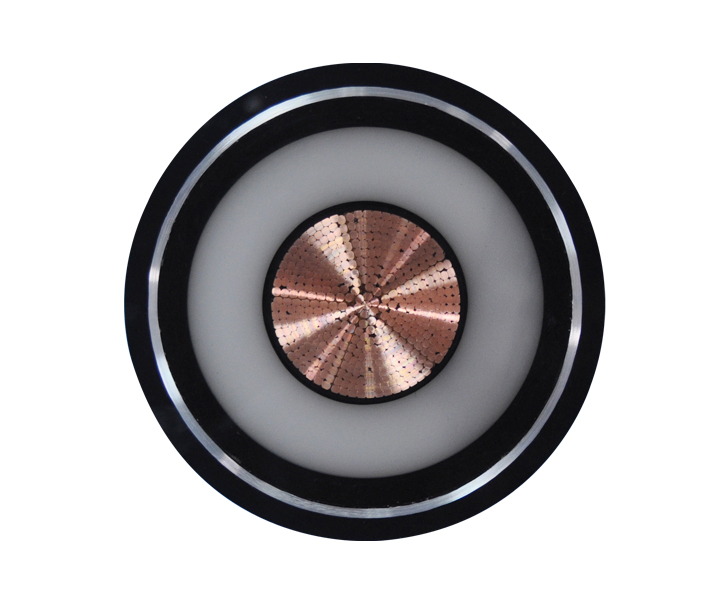
Routing power between facilities or to outdoor security systems requires specialized infrastructure. You must utilize an Underground Power Cable designed for direct burial. Standards like UF-B dictate strict requirements for moisture resistance and physical shielding. These cables prevent groundwater ingress and resist damage from soil shifting or minor impacts. Never use standard indoor wiring for exterior conduit runs; condensation will eventually cause a ground fault.
Healthcare facilities operate under strict regulatory compliance. Medical equipment requires "Hospital Grade" (Green Dot) cables. These cables undergo rigorous testing for grounding reliability and physical durability. They must withstand frequent plugging and unplugging, heavy physical stress, and harsh cleaning chemicals without compromising patient safety. A broken ground pin in a hospital setting can be fatal.
Auditing and purchasing cables requires strict quality control. Poor procurement decisions introduce systemic vulnerabilities across your infrastructure. Buying the cheapest cable on the market usually costs more in downtime and replacement hardware.
Uncertified, low-cost cables flood the market. Counterfeiters often use copper-clad aluminum (CCA) wiring disguised as pure copper. CCA has higher electrical resistance and lower flexibility than pure copper. It overheats easily and breaks under minimal physical stress. Using CCA cables in enterprise environments guarantees eventual failure. We have seen CCA cables melt under loads that pure copper handles easily.
You must establish a framework for verifying safety marks. Look for legitimate UL, CSA, CE, and RoHS certifications. Do not trust printed logos alone. Verify the UL file number through the official UL database. Certified cables guarantee the materials and construction meet established safety standards. If a vendor cannot provide a valid UL file number, do not buy their cables.
Long cable runs introduce voltage drop. As current travels through a wire, natural resistance causes a decrease in voltage. If the voltage drops too low, connected equipment will malfunction, reboot unexpectedly, or sustain permanent power supply damage. This is especially problematic for high-draw devices located far from the breaker panel.
You must up-size the wire gauge when deploying cables beyond standard lengths. For runs exceeding 15 to 20 feet, move to a lower AWG (thicker wire) to maintain stable power delivery. Calculate the expected voltage drop based on the cable length, wire gauge, and the device's amperage draw before finalizing your installation. A 50-foot run for a 15-amp device requires at least 12 AWG wire to prevent excessive voltage drop.
A: You must determine if the device uses a straight AC power cable or an AC/DC adapter. Straight cables only pass current. Adapters convert AC to DC and regulate voltage. Read the device's input requirements. For adapters, the replacement must match the voltage exactly, meet or exceed the amperage, and have identical tip polarity.
A: No. Standard PCs use C13 connectors, while high-end servers typically require C19 connectors designed for higher current. Even if the server accepts a C13, you must ensure the cable's AWG rating matches or exceeds the server's power supply requirements to prevent overheating.
A: The cable will restrict current flow, causing the internal wiring to overheat. This leads to severe voltage drop, unexpected equipment shut-downs, melted insulation, and a high risk of electrical fires. Always match or exceed the device's amperage requirements.
A: No. While the physical C13 connector is identical, the internal construction varies wildly. The wire gauge (AWG), jacket material, temperature ratings, and safety certifications differ between manufacturers. A C13 cable for a monitor may safely carry 10 amps, while one for a switch must carry 15 amps.
A: You likely encountered a visual similarity trap. For example, a C15 connector features a specific notch. This notch prevents standard C13 cables from being inserted into high-temperature appliances. Never force a connector into a receptacle; evaluate the specific IEC standard required.
A: First, check the device receptacle shape to identify the IEC standard (e.g., C14, C20). Second, read the device's data plate for maximum input voltage and amperage. Finally, ensure the plug matches your wall outlet or PDU type, and select an appropriate wire gauge.
A: While electrically capable, direct burial cables are typically too rigid, over-engineered, and not code-compliant for flexible, exposed indoor device connections. They are designed for permanent installation in harsh environments, not for plugging in a desktop computer.
 简体中文
简体中文 

